Dragon Adventures Legendary Colors Guide & Elements
Discover all dragon adventures legendary colors and element breath effects in Roblox. Get the latest tips on potions and shifting colors today!
Published: Dragon Adventures Wiki Editorial Team
Table of Contents
Introduction to Dragon Adventures Legendary Colors
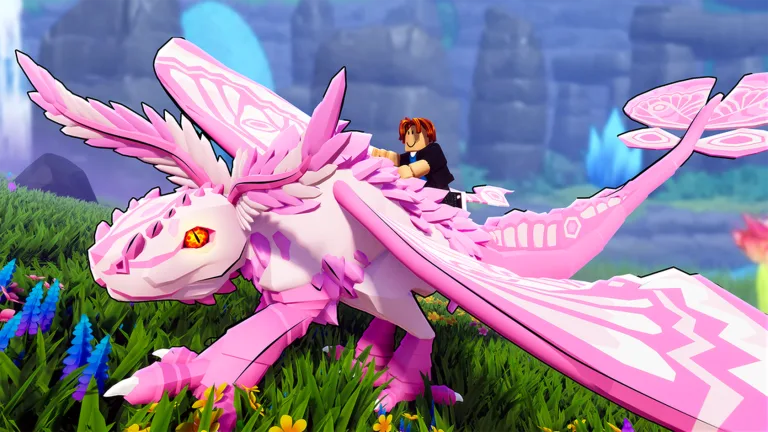
Transforming your scaling companions into breathtaking masterpieces is one of the most exciting aspects of playing Sonar Studios' hit Roblox experience. If you want to make your creatures truly stand out on the trading market or in your personal lair, understanding dragon adventures legendary colors is essential for any dedicated player. These rare cosmetic traits completely alter your dragon's visual appeal by giving their eyes, pupils, and elemental breath attacks stunning, rare color combinations.
Knowing how these aesthetic features work lets you customize your stable efficiently and recognize high-value traits during trades. According to community reports and wiki data, there are currently 149 distinct elements in the game, many of which unlock spectacular shifting color palettes when paired with the right potions.
Legendary Color Potion
This rare item applies a shifting or solid legendary color scheme to your dragon's body and features, matching its assigned element.
Legendary Pupil Potion
Using this potion makes your dragon's eyes glow with a vibrant neon appearance, elevating the overall rarity and aesthetic value of your pet.
How Legendary Colors Work with Elements
Every dragon in the game hatches or is bred with a specific element that dictates its breath attack and eye coloration. While normal elements provide standard visual effects, applying a legendary potion introduces a dynamic layer of customization. Some elements produce solid legendary fills, while advanced tier and event elements create smooth, multi-tone color shifts.
For instance, foundational elements like Fire and Grass produce solid tones such as Carrot and Green. In contrast, higher-tier elements and event-exclusive elements cycle through multiple hues. You can check the official Roblox Dragon Adventures Game Page to experience these visual updates live in your servers.
Element Tier
Example Elements
Legendary Color Type
Typical Shifting / Solid Output
Tier 0
Fire, Water, Grass
Solid
Carrot, Blue, Green
Tier 1
Air, Lava, Ocean
Shifting / Solid
Dune to Glow, Bermuda
Tier 3
Angel, Moon, Sun
Shifting
Banana to Sakura, Lemon to Pepper
Event
Ghost, Festive, Sugar
Shifting
Pistachio, Mint, Glow to Banana
Natural and Event Elements Overview
The vast catalog of elements spans standard natural tiers, seasonal events, and special collaborative updates. Players frequently track these variations to breed or trade dragons with the rarest aesthetic combinations. Based on player experience, event elements like Ghost, Vampire, and Snowflake are particularly prized during their respective holiday updates because of their animated breath effects and complex color transitions.
When breeding two different elements together, you have a 33% chance of mutating into an applicable third element, offering another pathway to rare looks without relying solely on potions.
Open your Lair and select the specific dragon you wish to customize.
Inspect its current element type under the customisation tab to check its compatibility.
Apply a Legendary Color Potion or Legendary Pupil Potion from your inventory.
Observe the newly unlocked shifting gradient or solid neon pupil effect on your dragon.
Top Shifting Color Combinations
Certain elemental combinations are legendary among collectors due to the sheer number of color transitions they display. High-tier options like Equinox or seasonal favorites like Vivid Bloom showcase sprawling arrays of hex codes shifting seamlessly across the dragon's model.
The table below outlines a few standout elements and their legendary shifts:
Element Name
Source / Event
Legendary Color Shifting Sequence
Equinox
Sun + Moon Breeding
Pitch - Pepper - Carrot - Banana
Pixie
Eteralix Pack
Night - Sapphire - Amarklor - Urchin - Purple
Vivid Bloom
Season 5
Lemon - Apricot - Magenta - Turquoise - Cyan
Aspect
Lego Ninjago Event
Sunrise - Orange - Marigold - Banana - Glow
Tip
Always verify whether a dragon's element supports color shifting before trading valuable items, as Tier 0 elements only display solid colors.
Frequently Asked Questions
Do all dragon adventures legendary colors shift through multiple shades?
No, elements like Fire, Grass, Water, Ocean, and Light output solid legendary colors rather than shifting gradient patterns.
How do I get a legendary color on my dragon?
You can obtain these visual traits by using a Legendary Color Potion or a Legendary Pupil Potion on a dragon with your desired element.
Can I change my dragon's element after hatching?
Yes, you can use Basic Elemental Potions, standard Elemental Potions, or event-specific element potions to change your dragon's element.